What actually happens when I place a buy order?
Short answerWhen you place a buy order on a crypto exchange, its matching engine compares it with the sell orders waiting in the order book. If your order can pay the lowest asking price, it trades at once against the cheapest sell orders and moves up a level when one runs out. On the synthetic XYZ book used below, a market buy for 15 XYZ fills at 100.10, 100.20 and 100.30, an average 0.21% above the last traded price of 100.00. A limit buy priced below every sell order waits in the book until a seller meets it, you cancel it or it expires. Use a market order when filling now matters more than the price, and a limit order when the price matters more.
Scope note: Exchange details in this lesson follow Binance's Spot API documentation as of 26 November 2026, because Valmy v1 trades on Binance Spot and USDⓈ-M futures. The order book in the worked example is synthetic, for a made-up token called XYZ.
The order book: bids, asks and depth#
An order book is the exchange's list of orders waiting to trade on one market, such as XYZ/USDT. Each market has its own book, so BTC/USDT and BTC/USDC are separate books even on the same exchange. The book has two sides:
- Bids are buy orders: "I will buy this quantity at this price or lower." The best bid is the highest one.
- Asks (also called offers) are sell orders: "I will sell this quantity at this price or higher." The best ask is the lowest one.
- The spread is the best ask minus the best bid. Nothing trades inside the spread until someone is willing to cross it.
- Depth is how much quantity waits at each price. A deep book has large quantities near the best prices. A thin book has little.
- The last traded price is the price of the most recent trade. It is the number most apps show in large type, but it is history. Your next buy will trade against the asks that are waiting now, not at the last price.
A depth ladder shows the book as rows of prices with the quantity waiting at each one, asks above and bids below. Figure 1 in the worked example uses this view.
Market orders and limit orders#
The two basic order types trade off certainty of execution against control of price.
A market order says: buy this quantity now at the best prices available. It trades immediately against the asks, starting with the cheapest, until it is complete or the book runs out. Execution is almost certain in an active market, but the price is not guaranteed. The U.S. Securities and Exchange Commission's investor bulletin on order types makes the same point for stocks: the last traded price is not necessarily the price you get, and parts of a large market order can fill at different prices. On Binance Spot, a market buy can name either the quantity of the coin to buy or the amount of USDT to spend (the quoteOrderQty parameter), and the exchange works out the quantity from the book.
A limit order says: buy this quantity at this price or lower. A buy limit can never fill above its limit, but it may fill only partly or not at all if sellers never come down to that price. If its limit is at or above the best ask, the part that can trade does so immediately at the ask prices, which can be better than the limit. Whatever can't trade waits in the book.
Exchanges also offer conditional orders, such as stop orders, which wait for a trigger price and then send a market or limit order. They are covered in What is a stop order, and why can it fill worse than its trigger price?.
How the matching engine decides who trades first: price-time priority#
Exchanges such as Binance match orders by price-time priority: the best price trades first, and among orders at the same price, the one that arrived earlier trades first. For a buy, "best" means the lowest ask. For a sell, it means the highest bid.
Binance's API documentation shows this rule in an example about reducing an order's size. An order keeps its place in the queue if its quantity is reduced in place. If it is canceled and replaced, the new order goes behind the orders already waiting at the same price and trades after them.
Two consequences follow:
- A market order or a crossing limit order walks the book: it takes the best ask level, then the next one, and so on, until it is complete. Each match is a separate fill with its own price and quantity.
- A resting limit order joins the back of the queue at its price. Several orders may have to trade before yours, so seeing a trade at your price doesn't guarantee your order was filled.
Makers and takers: who adds liquidity and who removes it#
A maker is an order that rests in the book and is filled later by someone else. It "makes" liquidity because it gives others something to trade against. A taker is an order that trades immediately against orders already in the book, which removes liquidity. Binance's support pages define it this way, and they add that market orders are always takers, and that a limit order is a taker for any part that trades as soon as it arrives.
The role matters because exchanges can charge makers and takers different fees. As of 26 November 2026, Binance's base Spot tier charges 0.100% to both, or 0.075% when the fee is paid in BNB. Its USDⓈ-M futures base tier charges 0.0200% to makers and 0.0500% to takers. The lesson How much do trading fees cost me over a year? works through what those rates add up to.
A limit order doesn't guarantee maker status. A limit buy priced at or above the best ask trades immediately as a taker. Binance offers a post-only order type (LIMIT_MAKER) that the exchange rejects if it would trade immediately, so it can only ever be a maker.
Time in force: GTC, IOC and FOK#
Time in force tells the exchange how long an order may stay active. Binance Spot supports three values for limit orders:
- GTC (good till canceled): whatever doesn't fill immediately rests in the book until it fills or you cancel it.
- IOC (immediate or cancel): fill as much as possible right away, then cancel the rest. Nothing rests in the book.
- FOK (fill or kill): fill the whole quantity right away or cancel all of it. No partial fill is allowed.
IOC and FOK orders never rest in the book, so on Binance they are always takers. A market order never rests either: if the book runs out before the order is complete, Binance fills what it can and expires the rest. The worked example shows the three choices on the same book.
Worked example: a limit buy that rests, then a market buy that walks the book (synthetic data)#
This example uses synthetic data: an invented order book for a made-up token, XYZ, quoted in USDT. The last trade was at 100.00 USDT. The book holds these orders (quantities in XYZ):
| Side | Price (USDT) | Quantity | Orders, earliest first |
|---|---|---|---|
| Ask | 100.80 | 20 | one order |
| Ask | 100.50 | 12 | one order |
| Ask | 100.30 | 8 | one order |
| Ask | 100.20 | 6 | one order |
| Ask | 100.10 | 4 | 1.5, then 2.5 |
| Bid | 99.90 | 5 | one order |
| Bid | 99.80 | 7 | one order |
| Bid | 99.70 | 9 | one order |
| Bid | 99.50 | 14 | one order |
The best ask is 100.10 and the best bid is 99.90, so the spread is 0.20 USDT. Assume the Binance base Spot fee of 0.100% for both makers and takers, with no BNB discount.
Step 1: a limit buy below the best ask rests in the book#
Ana sends a GTC limit buy for 3 XYZ at 99.95. The cheapest ask is 100.10, above her limit, so nothing trades. Her order rests in the book and becomes the new best bid, because 99.95 is higher than 99.90. The spread narrows to 100.10 − 99.95 = 0.15 USDT.
Ana now has an open order with status NEW. The exchange sets aside the USDT she would need: 3 × 99.95 = 299.85 USDT moves from her free balance to her locked balance. She can't spend it elsewhere while the order is open. If her order fills later, she will be a maker.
Step 2: a market buy walks up three price levels#
Next, Ben sends a market buy for 15 XYZ. The engine takes the asks in price-time order:
| Fill | Price (USDT) | Quantity (XYZ) | Value (USDT) |
|---|---|---|---|
| 1 | 100.10 | 1.5 (the earlier order) | 150.15 |
| 2 | 100.10 | 2.5 | 250.25 |
| 3 | 100.20 | 6 | 601.20 |
| 4 | 100.30 | 5 of the 8 waiting | 501.50 |
| Total | 15 | 1,503.10 |
Ben's average price is 1,503.10 ÷ 15 ≈ 100.207 USDT. That is about 0.107 USDT (0.11%) above the best ask he saw, and 0.21% above the last traded price of 100.00. Buying 15 XYZ at 100.00 would have cost 1,500.00, so Ben paid 3.10 USDT more than the price on screen suggested, before fees. The lesson Why did I pay more than the price on screen? breaks that gap down.
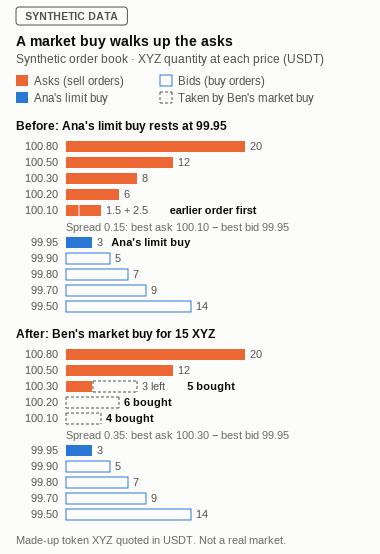
After the market buy, the book has changed:
- The last traded price is now 100.30, the price of Ben's final fill.
- The best ask is 100.30, with 3 XYZ left. The next buyer starts there.
- The spread has widened to 100.30 − 99.95 = 0.35 USDT.
- Ana's bid at 99.95 is untouched, because a buy order only trades against asks.
Ben was a taker on all four fills. Binance takes the fee on a buy from the asset received, unless it is paid in BNB: 0.100% of 15 XYZ = 0.015 XYZ. His account is debited 1,503.10 USDT and credited 14.985 XYZ. Binance's API returns this as a list of fills, each with its price, quantity and commission. The documentation's own sample response, for a market sell of 10 units, lists five fills at five different prices.
Step 3: the resting limit order fills later as a maker#
A little later, Cara sends a market sell for 4 XYZ. A sell takes the bids from the highest down. Ana's 3 XYZ at 99.95 are first, so they fill completely. The last 1 XYZ fills at 99.90, against the order that was waiting there.
Ana's order status becomes FILLED. Her 299.85 locked USDT is spent, and she receives 3 XYZ minus the 0.100% maker fee of 0.003 XYZ, so 2.997 XYZ. She got exactly her limit price, and she had to wait for a seller to come to her. Had no seller come down to 99.95, her order would still be waiting, and Ben's market buy shows that price could just as easily have moved away from her.
Same order, three time-in-force choices#
Go back to the book just before Ben's order. Suppose Ben had sent a limit buy for 15 XYZ at 100.20 instead of a market order. Only 10 XYZ are offered at 100.20 or lower (4 at 100.10 and 6 at 100.20). The time in force decides what happens to the other 5:
| Time in force | What fills now | What happens to the rest | Order status |
|---|---|---|---|
| GTC | 10 XYZ for 1,001.60 USDT, average 100.16 | 5 XYZ rest as a bid at 100.20, locking 501.00 USDT | PARTIALLY_FILLED |
| IOC | 10 XYZ for 1,001.60 USDT, average 100.16 | 5 XYZ are canceled | EXPIRED |
| FOK | Nothing, because 15 can't fill in full | All 15 are canceled | EXPIRED |
The limit protected Ben from paying 100.30 for the last 5 XYZ. In exchange, he either waits with an open order (GTC), accepts a smaller position (IOC) or gets nothing (FOK).
What "filled" means for your balance#
An order is filled when trades have used up its whole quantity. Along the way it passes through statuses that Binance's API reports:
NEW: accepted by the matching engine and resting in the book, with nothing traded yet.PARTIALLY_FILLED: some quantity has traded, and the rest is still open.FILLED: the whole quantity has traded.CANCELED: you canceled it. Any part that already traded stays traded.EXPIRED: the order's own rules ended it, such as an IOC or FOK limit that couldn't fill, or a market order that ran out of book.REJECTED: the engine refused it, for example because the order breaks the market's trading rules.
Each fill changes your balances right away. On a Spot buy, the exchange takes the quote asset (USDT) and credits the base asset (XYZ). It deducts the fee from the asset you receive, unless you pay it in BNB. While a limit order is open, the funds it could use are locked. They return to free balance if you cancel it.
On a centralized exchange, a fill changes the exchange's own record of what you hold. No coins move on a blockchain until you withdraw them. What that means for ownership is covered in What do I own when I hold crypto on an exchange?.
How Valmy strategies send orders after a closed candle#
Valmy note: as of 26 November 2026, Valmy's specification evaluates each strategy once per closed five-minute candle on one market. When a rule is true, the strategy emits its order after that candle has closed. A Spot buy rule names an amount of the quote asset to spend, such as 20 USDT. The order then meets whatever book exists after the close.
Two practical points follow from this lesson:
- The candle's close is not your fill price. A rule that fires on a candle closing at 100.00 trades against the asks available after that close. Those asks may sit higher or lower, and a larger order may walk several levels. Valmy's backtests follow the same principle: they simulate the earliest execution on a later bar, using a spread, slippage and fee model, rather than filling at the signal candle's close.
- Every fill is reconciled. Valmy's strategy accounting applies each partial fill and the actual fee in the asset charged. A strategy's holdings change when fills arrive, not when the order is sent.
This lesson describes how the exchange handles orders. Execution details beyond these points depend on the product as released, so check them in the app.
What could change what happens to your order#
The worked example assumed a calm book that held still while each order arrived. Real conditions can change the outcome:
- The book can be thinner than it looks. If a market order is larger than the asks available, Binance fills what it can and expires the rest. In a thin market, a modest order can walk far up the book. See What makes a market liquid, and why does it matter for my order?.
- The book moves while your order travels. Other traders' orders can arrive first and take the asks you saw. The SEC bulletin gives this example for stocks: a market order can fill at a higher price if other orders execute first.
- Trading rules can reject an order. Each Binance market has filters, such as a minimum quantity, a minimum order value and a price step (tick size). An order that breaks them is rejected. A market order is also rejected if your balance can't cover it.
- Stop-market orders turn into market orders. A stop-market sell that triggers in a falling market fills against whatever bids remain at that moment. That is why it can fill well beyond its trigger price.
- Venues differ. Order types, priority rules and fee schedules vary between exchanges and between Spot and futures on the same exchange. Check the documentation of the venue you actually use.
Check your understanding: filling a small buy order#
Question. A synthetic XYZ/USDT book has asks of 2 XYZ at 50.00, 3 XYZ at 50.05 and 10 XYZ at 50.20. The taker fee is 0.100%, and you don't pay it in BNB.
- You send a market buy for 4 XYZ. Which fills do you get, what is your average price and how much XYZ is credited?
- Instead, you send a FOK limit buy for 4 XYZ at 50.05. Does it fill?
- Instead, you send a limit buy for 4 XYZ at 50.00. What happens with IOC, and what happens with GTC?
Show the answers
Answer.
- You take the cheapest asks first: 2 at 50.00 (100.00 USDT) and 2 at 50.05 (100.10 USDT). The total is 200.10 USDT and the average price is 50.025. You are a taker. The fee is 0.100% of 4 XYZ = 0.004 XYZ, so 3.996 XYZ is credited and 200.10 USDT is debited.
- Yes. There are 5 XYZ offered at 50.05 or lower, enough for all 4, so the FOK order fills in full with the same fills as in part 1.
- Only 2 XYZ are offered at 50.00 or lower. With IOC, 2 fill at 50.00 and the other 2 are canceled, and the order ends as
EXPIRED. With GTC, 2 fill at 50.00 and the other 2 rest as a bid at 50.00, locking 100.00 USDT, with statusPARTIALLY_FILLED. They fill later only if a seller comes down to 50.00.
Related lessons#
- Before this lesson: no earlier lesson is needed. This is a starting point for the library.
- Next: Why did I pay more than the price on screen?
- Next: How much do trading fees cost me over a year?
- See also: What makes a market liquid, and why does it matter for my order?
- See also: What is a stop order, and why can it fill worse than its trigger price?
- See also: What do I own when I hold crypto on an exchange?